

WorldofAI builds a three-bot team in a walkthrough sponsored by Grok Bot. Rather than giving every task to one conversation, the channel assigns research to Scout, equipment shopping to Shopper and a recurring YouTube workflow to Desk. The demonstration follows their work from initial instructions to files, a shopping cart awaiting approval and a scheduled tracker update.
Three roles on a shared cloud computer
The channel introduces each bot as a teammate with a job, conversation and memory. The bots work on a persistent cloud computer with a browser, files and terminal. They share the machine’s files and signed-in sessions, while their work can continue when the user closes a laptop. The walkthrough separates the jobs but later brings two bots into the same conversation for a handoff.
WorldofAI also makes approval rules part of the setup: a bot can perform the preparatory work, then stop at a point that needs the user’s judgment. The shopping example puts that boundary at checkout.
Creating Scout and defining a research brief
The first bot is created with the New command, named Scout and given the label “AI research scout.” Its assignment is specific: find the five biggest AI stories from the past week, verify each against a primary source, rank them for video potential and save a briefing file.

WorldofAI asks Scout to make the checks in Chrome so its activity is visible. The recorded sequence shows it opening official announcements from OpenAI, Mistral, Anthropic and Google, examining dates and claims rather than relying only on a list of headlines.
A ranked file and claims that did not hold up
The channel says the research run took about four minutes; the browsing sequence in the video is sped up. Scout returns five ranked stories, each with a potential hook and a source link, saved in an AI briefing.md file.

WorldofAI highlights another part of the result: three claims were flagged because they did not hold up against the official pages. The channel presents those flags alongside the briefing as part of the demonstrated verification process. The saved research then becomes material that another bot can use later in the session.
Giving Shopper a budget and a stopping point
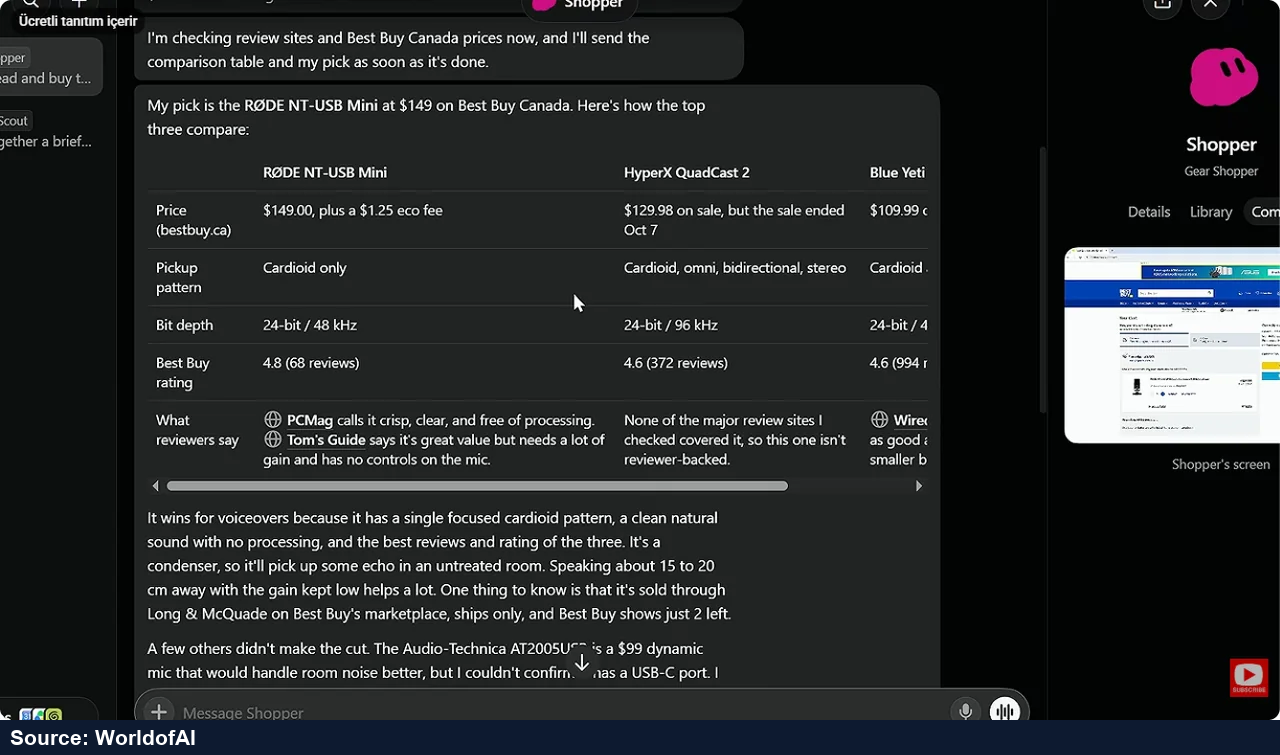
The second bot, Shopper, receives a name and label through the same setup. WorldofAI notes that it already has context about the channel and Scout. This time the assignment is to find a USB-C microphone for voiceovers with a budget below $150, compare three leading options, put the preferred one in a Best Buy cart and stop before checkout.
Shopper browses review sources, including Tom’s Guide and Wirecutter, then checks Best Buy for models, prices and availability. When a page fails, the demonstration moves to another source. WorldofAI reports that this shopping run took about ten minutes without manual intervention.
From microphone comparison to a purchase question
The result is a comparison table covering price, pickup patterns, bit depth and reviewers’ comments. The bot selects the RØDE NT-USB Mini and, according to the walkthrough, adds it to the cart. The $150 figure is the requested budget ceiling.

Shopper then asks whether to buy the microphone. WorldofAI does not approve the purchase during the demonstration. The channel uses this stopping point to explain its approval setup for actions such as buying, sending, deleting and publishing, and says an ask-first rule takes precedence when it conflicts with an allow rule.
Teaching Desk by performing the task once
Desk’s role is to track the channel’s latest videos each week. Instead of beginning with a written procedure, WorldofAI opens Teach a Skill from the plus menu, starts recording on Desk’s computer and demonstrates the task: open the channel’s Videos tab, check that it is sorted by latest and review the newest uploads.
After the recording stops, Desk studies the demonstration and saves a reusable skill. WorldofAI opens it to inspect the inputs, steps and reporting instructions. The channel points out a rule the bot added: copy the displayed numbers exactly rather than estimating them. The learned instructions can also be edited.

Turning the skill into a six-video spreadsheet
WorldofAI invokes the saved skill through a slash command and asks Desk to check the channel and save its six newest videos to a spreadsheet. Desk performs the workflow on its cloud computer and returns a channel-tracker Excel file.

The reported columns include titles, view counts, upload age and links. The channel describes the file as a way to compare videos across weekly checks, extending the demonstrated browsing steps into a concrete tracking document.
Scheduling Monday’s snapshot and testing a copy
Next, WorldofAI asks Desk to add a snapshot every Monday at 9:00 and report which video gained the most views. Desk creates a routine in the conversation. Its panel shows the description, instructions and schedule, together with controls to pause, edit or delete it.

The channel then asks for a test. Desk runs it on a copy, keeping the real tracker clean for the Monday update. This connects three stages of the walkthrough: a demonstrated task becomes a saved skill, the skill produces a file, and a routine schedules the same work.
Passing research from Scout to Desk
The final demonstration puts Scout and Desk in a group chat. WorldofAI asks Scout to choose the strongest idea from the week’s briefing and pass it to Desk for a new ideas sheet. In the example, Scout selects a GPT-6 story and prepares a working title and hook; Desk can add it to the tracker as a planned video for the following week.

The channel closes the practical sequence with the three outcomes: Scout has produced research, Shopper has prepared a cart and waited for approval, and Desk has learned a workflow, created a tracker and scheduled a weekly routine. The group conversation shows how the research and tracking roles can connect without manually copying the brief between them.

